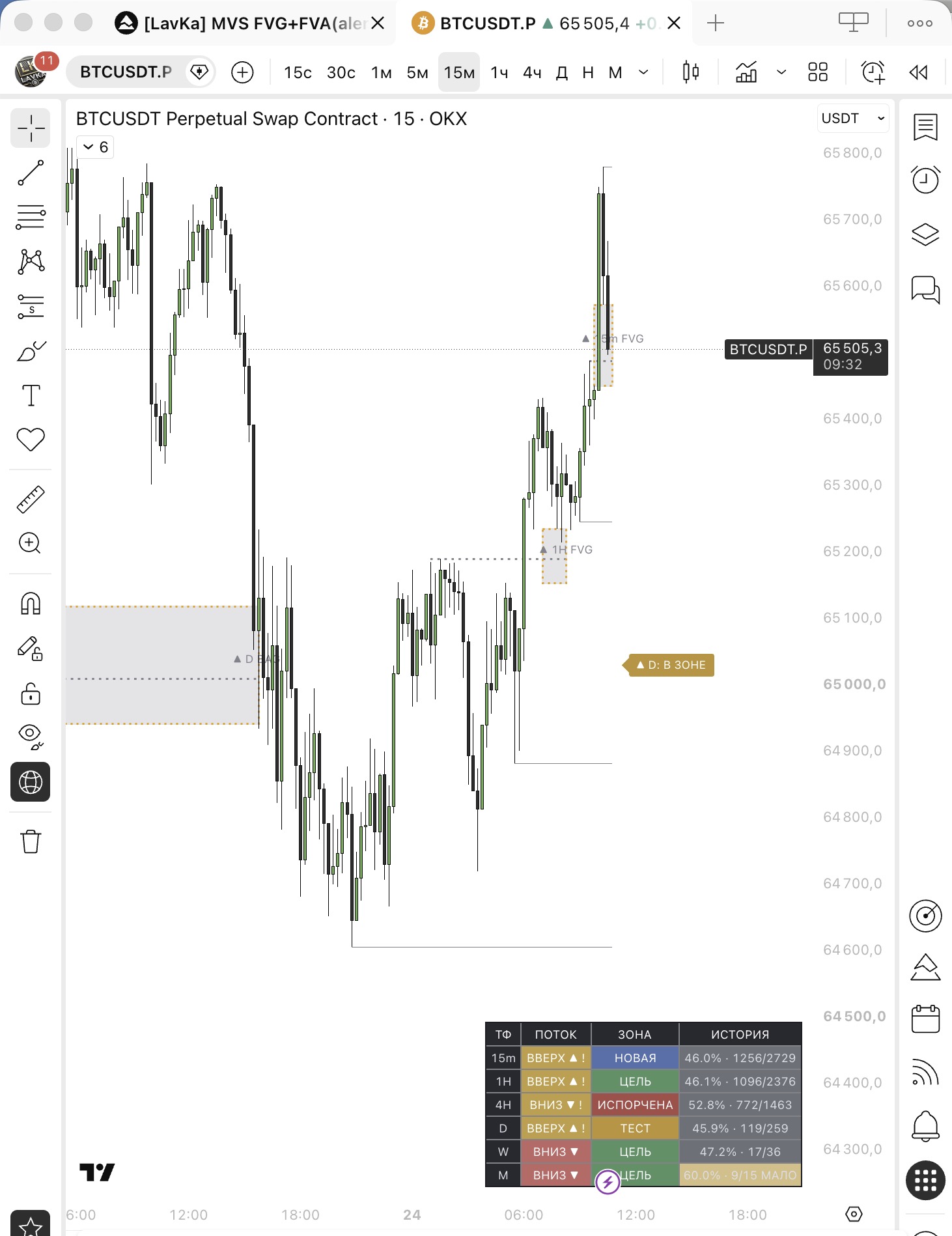
Lavka Trading Indicators

Professional indicators built on SMC and institutional logic.

Lavka Trading Indicators reduce subjective analysis and highlight structured zones where price reaction is more likely. Access is delivered manually through Telegram and linked to your TradingView account.

from $10 / month manual TradingView delivery Telegram support status and duration in cabinet
Lavka Trading Indicators screen
Access format You write in Telegram, send your TradingView username, and receive manual access activation.

Modules

Core modules of the system.

FVG + FVA Indicator FVG + FVA

FVG + FVA Indicator

Fair Value Gap and Fair Value Area capture imbalance that the market often revisits after an impulse. On a lower timeframe, you can still see higher-timeframe FVG and FVA structure on the same chart.

  • automatic FVG detection
  • FVA discovery and retest logic
  • higher-timeframe zones on a lower chart
  • zone status, visual color coding, and freeze-after-retest
Order Block Indicator Order Block

Order Block Indicator

Institutional supply and demand zones built from impulse, liquidity removal, and displacement. Both local and higher-timeframe Order Blocks remain visible on the same lower-timeframe chart.

  • bullish and bearish OB detection
  • institutional candle grouping
  • higher-timeframe OB zones on lower charts
  • confirmation through impulse, imbalance, and zone status
HTF Liquidity Zones HTF Zones

HTF Liquidity Zones

Higher timeframe zones (D / 4H / W) are projected onto lower charts to provide context for current movement. Daily zones are marked explicitly so the strongest levels stand out immediately.

  • multi-timeframe analysis
  • separate daily zone marking
  • key liquidity level mapping
  • zone extension to the current candle
Strategy Development Strategy

TradingView strategy development

We can turn your trading idea into a testable TradingView strategy with clear entry, exit, and filtering logic.

  • translate the idea into systematic logic
  • entry, exit, and filter rules
  • setup for testing and scale
  • pricing and implementation after agreement

Access

How indicator access works.

Manual delivery

Access is granted manually through your TradingView account.

This is a transparent flow with no hidden promises. You write in Telegram, send your TradingView username, choose the module and duration, and the access is activated manually afterwards.

  1. Write in Telegram We clarify which indicator you need: FVG + FVA, Order Block, HTF Zones, or the full set.
  2. Send your TradingView username Access is linked to your account, so the username must be exact.
  3. Confirm the plan We agree on the module, duration, and payment in Telegram.
  4. Receive activation After confirmation, access is manually opened in TradingView.

Clear conditions

It is immediately clear what happens and how.

  • access is granted manually by the owner through TradingView
  • there is no instant automatic access on the site
  • your TradingView username is required
  • access is linked to one account
  • payment status and duration are fixed in the cabinet
  • renewals and support also go through Telegram

What to send

TradingView username required module duration

Trust

Transparent early-access format.

Below are real working screens: the public invite-only script page, script description, and the access management panel. Access is granted manually by the owner through TradingView.

Public page of a Lavka invite-only script in TradingView

Public script page

The indicator is published as an invite-only script with restricted access.

Script description and access request instructions in TradingView

Description and instructions

The page includes strategy notes and a clear format for requesting access.
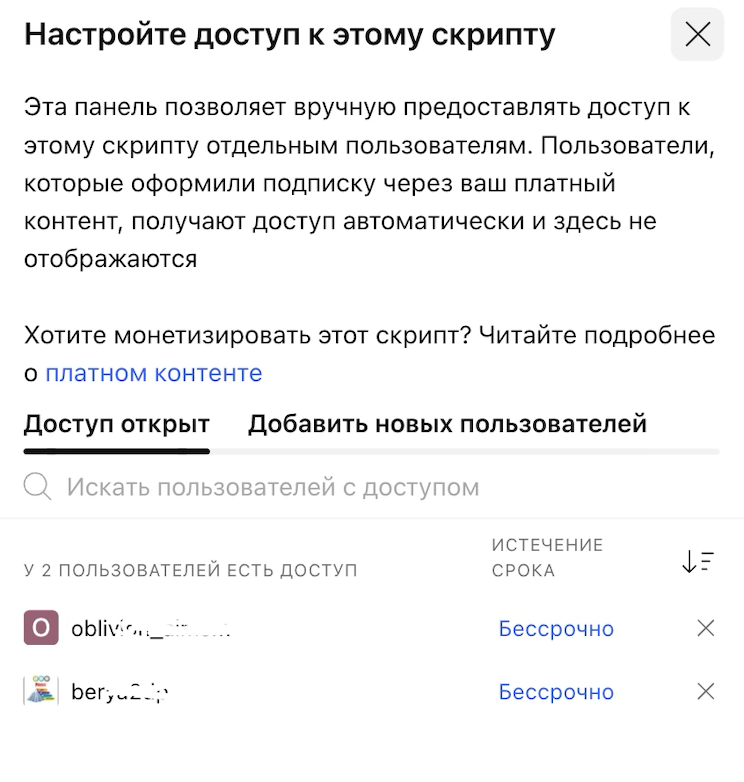
Access management panel for invite-only script in TradingView

Access control panel

A dedicated TradingView screen where access is manually assigned to users (personal usernames are hidden).

Order flow

How ordering works and why it stays transparent.

How the order works

Clear steps, fixed communication, and manual access activation.

  1. Request in Telegram You write in Telegram and specify which module you need and for what duration.
  2. Scope confirmation We confirm your TradingView username, access format, and final module setup.
  3. Price agreement We fix pricing, duration, and renewal terms before activation.
  4. Manual activation Access is granted manually in TradingView, and the status is mirrored in cabinet and Telegram.

Activation is usually completed the same day or according to the agreed queue.

Why clients trust this

No hidden promises and no fake “instant access” flow.

  • access is granted manually by the owner through TradingView
  • terms are clear upfront: module, duration, price, renewal
  • communication goes through Telegram with direct response
  • statuses are fixed in the cabinet: payment, active access, duration
  • early-access stage is described honestly without fake sales claims

What the client sees

payment status active module access duration next step

Pricing

How the product is priced at the start.

Base entry

Indicator access

from $10 / month The exact module and format are confirmed in Telegram before access is granted.

Expanded setup

Multiple modules

by agreement If you need a bundle of modules, pricing and format are confirmed separately.

Custom work

TradingView strategy

separate estimate If you need your own scenario, we estimate the logic, scope, and implementation separately.

Support

Access renewal

cabinet and Telegram Renewals, access duration, account questions, and support are fixed in the cabinet and mirrored through personal Telegram.

Contact

To get access, write in Telegram and send your TradingView username.

Then the access will be granted manually, while duration and activation status stay visible through the cabinet and Telegram.